{{
    config(
        materialized='incremental'
    )
}}

select
    *,
    my_slow_function(my_column)

from {{ ref('app_data_events') }}

{% if is_incremental() %}

  -- this filter will only be applied on an incremental run
  -- (uses >= to include records whose timestamp occurred since the last run of this model)
  -- (If event_time is NULL or the table is truncated, the condition will always be true and load all records)
where event_time >= (select coalesce(max(event_time),'1900-01-01') from {{ this }} )

{% endif %}dbt anti-pattern: using {{ this }} directly in incremental refreshes
If you’re using dbt, the recommended default way to build incremental models looks like this:
If you’re unfamiliar with dbt’s Jinja syntax, { this } refers to the table that is built incrementally. If the table doesn’t exist yet, dbt ignores the where condition and just runs the query. Afterwards, it checks the freshness of the incremental table via max(event_time). The latest date is passed back to the source data so that we only add new data and avoiding running the query on data that was already processed and saved into the table.
Let’s run a very similar query in DuckDB using the taxi dataset. This is the query plan :
library(duckdb)Warning: package 'duckdb' was built under R version 4.4.3Loading required package: DBIcon <- dbConnect(duckdb::duckdb())
dbGetQuery(con, "explain analyze select * from 'taxi_2019_04.parquet' WHERE tpep_pickup_datetime > (select median(tpep_pickup_datetime) from 'taxi_2019_04.parquet')")analyzed_plan
┌─────────────────────────────────────┐
│┌───────────────────────────────────┐│
││ Query Profiling Information ││
│└───────────────────────────────────┘│
└─────────────────────────────────────┘
explain analyze select * from 'taxi_2019_04.parquet' WHERE tpep_pickup_datetime > (select median(tpep_pickup_datetime) from 'taxi_2019_04.parquet')
┌────────────────────────────────────────────────┐
│┌──────────────────────────────────────────────┐│
││ Total Time: 0.225s ││
│└──────────────────────────────────────────────┘│
└────────────────────────────────────────────────┘
┌───────────────────────────┐
│ QUERY │
└─────────────┬─────────────┘
┌─────────────┴─────────────┐
│ EXPLAIN_ANALYZE │
│ ──────────────────── │
│ 0 rows │
│ (0.00s) │
└─────────────┬─────────────┘
┌─────────────┴─────────────┐
│ PROJECTION │
│ ──────────────────── │
│ VendorID │
│ tpep_pickup_datetime │
│ tpep_dropoff_datetime │
│ passenger_count │
│ trip_distance │
│ RatecodeID │
│ store_and_fwd_flag │
│ PULocationID │
│ DOLocationID │
│ payment_type │
│ fare_amount │
│ extra │
│ mta_tax │
│ tip_amount │
│ tolls_amount │
│ improvement_surcharge │
│ total_amount │
│ congestion_surcharge │
│ Airport_fee │
│ │
│ 1,757,144 rows │
│ (0.00s) │
└─────────────┬─────────────┘
┌─────────────┴─────────────┐
│ NESTED_LOOP_JOIN │
│ ──────────────────── │
│ Join Type: INNER │
│ │
│ Conditions: │
│ tpep_pickup_datetime > ├──────────────┐
│ SUBQUERY │ │
│ │ │
│ 1,757,144 rows │ │
│ (0.05s) │ │
└─────────────┬─────────────┘ │
┌─────────────┴─────────────┐┌─────────────┴─────────────┐
│ TABLE_SCAN ││ PROJECTION │
│ ──────────────────── ││ ──────────────────── │
│ Function: ││ CASE WHEN ((#1 > 1)) THEN│
│ PARQUET_SCAN ││ ("error"('More than one │
│ ││ row returned by a │
│ Projections: ││ subquery used as an │
│ tpep_pickup_datetime ││ expression - scalar │
│ VendorID ││ subqueries can only │
│ tpep_dropoff_datetime ││ return a single row. │
│ passenger_count ││ Use "SET │
│ trip_distance ││ scalar_subquery_error_on_m│
│ RatecodeID ││ ultiple_rows=false" to │
│ store_and_fwd_flag ││ revert to previous │
│ PULocationID ││ behavior of returning a │
│ DOLocationID ││ random row.')) ELSE #0 END│
│ payment_type ││ │
│ fare_amount ││ │
│ extra ││ │
│ mta_tax ││ │
│ tip_amount ││ │
│ tolls_amount ││ │
│ improvement_surcharge ││ │
│ total_amount ││ │
│ congestion_surcharge ││ │
│ Airport_fee ││ │
│ ││ │
│ Total Files Read: 1 ││ │
│ ││ │
│ 1,757,144 rows ││ 1 row │
│ (0.26s) ││ (0.00s) │
└───────────────────────────┘└─────────────┬─────────────┘
┌─────────────┴─────────────┐
│ UNGROUPED_AGGREGATE │
│ ──────────────────── │
│ Aggregates: │
│ "first"(#0) │
│ count_star() │
│ │
│ 1 row │
│ (0.00s) │
└─────────────┬─────────────┘
┌─────────────┴─────────────┐
│ PROJECTION │
│ ──────────────────── │
│ #0 │
│ │
│ 1 row │
│ (0.00s) │
└─────────────┬─────────────┘
┌─────────────┴─────────────┐
│ UNGROUPED_AGGREGATE │
│ ──────────────────── │
│ Aggregates: │
│ median(#0) │
│ │
│ 1 row │
│ (0.04s) │
└─────────────┬─────────────┘
┌─────────────┴─────────────┐
│ PROJECTION │
│ ──────────────────── │
│ tpep_pickup_datetime │
│ │
│ 3,514,289 rows │
│ (0.00s) │
└─────────────┬─────────────┘
┌─────────────┴─────────────┐
│ TABLE_SCAN │
│ ──────────────────── │
│ Function: │
│ PARQUET_SCAN │
│ │
│ Projections: │
│ tpep_pickup_datetime │
│ │
│ Total Files Read: 1 │
│ │
│ 3,514,289 rows │
│ (0.09s) │
└───────────────────────────┘Our taxi table contains 7433139 rows, but the query scans the table twice! However, we would expect to see a full table scan to find the latest date and then a table scan that only scans a few rows or no rows at all. If you’re working with small datasets or overprovisioned servers, you probably wouldn’t notice this. For the longest time I didn’t! Now, as our team runs A LOT of queries, a slow query sticks out like a sore thumb.
So, what’s causing this behaviour? The problem is that the query engine doesn’t know the result of the subquery in the where clause. Because of this, it can’t project the where clause to the table, resulting in a full data scan. This is documented in BigQuery, MySQL, it replicates in Oracle, as well as DuckDB. Let’s fix this query!
Fixing the Query
Fixing the query requires us to separate the query into two queries. First, we need to save the latest date as a variable. Then, and only then, should we pass the variable to the final select statement. DuckDB has a useful feature called GETVARIABLE that allows us to do exactly that. dbt also supports variables, please refer to this StackOverflow answer. Here are benchmarks between a query that uses a subquery and one that first saves a variable:
library(duckdb)
library(dplyr)
Attaching package: 'dplyr'The following objects are masked from 'package:stats':
filter, lagThe following objects are masked from 'package:base':
intersect, setdiff, setequal, unioncon <- dbConnect(duckdb::duckdb())
filter_on_variable <- function() {
dbExecute(con, "SET VARIABLE median_tpep_pickup_datetime = (select median(tpep_pickup_datetime) from 'taxi_2019_04.parquet')")
dbGetQuery(con, "select * from 'taxi_2019_04.parquet' WHERE tpep_pickup_datetime > GETVARIABLE('median_tpep_pickup_datetime')")
}
filter_on_subquery <- function() {
dbGetQuery(con, "select * from 'taxi_2019_04.parquet' WHERE tpep_pickup_datetime > (select median(tpep_pickup_datetime) from 'taxi_2019_04.parquet')")
}
read_benchmark <- bench::mark(
min_iterations = 30,
filter_on_variable = filter_on_variable(),
filter_on_subquery = filter_on_subquery(),
check = TRUE
)
ggplot2::autoplot(read_benchmark) + ggplot2::labs(title = "Query run duration", subtitle = "Lower is better")Loading required namespace: tidyrWarning: `aes_string()` was deprecated in ggplot2 3.0.0.
ℹ Please use tidy evaluation idioms with `aes()`.
ℹ See also `vignette("ggplot2-in-packages")` for more information.
ℹ The deprecated feature was likely used in the bench package.
Please report the issue at <https://github.com/r-lib/bench/issues>.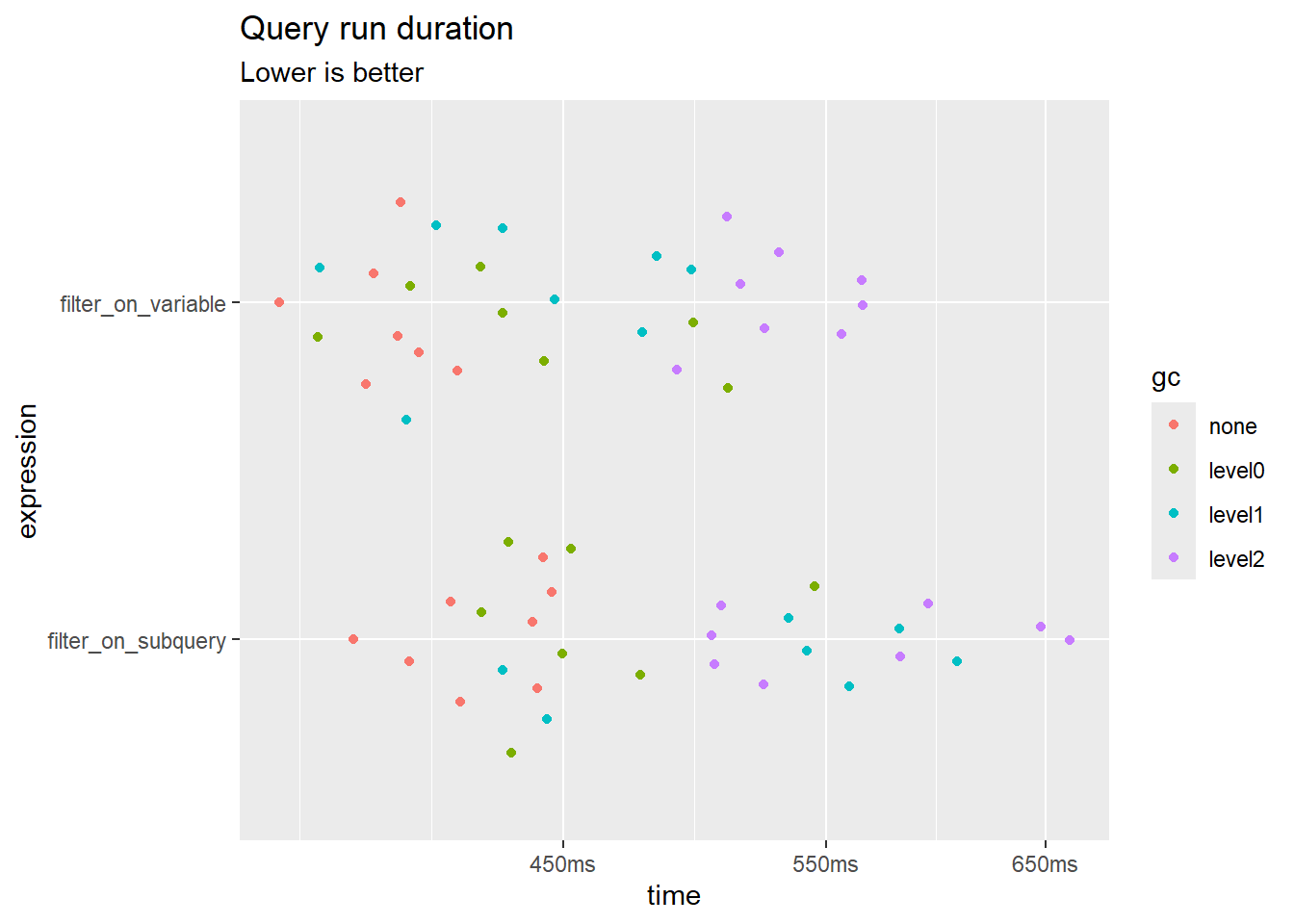
rm(read_benchmark)I know, the gain doesn’t seem THAT big. The difference diminishes if you’re running this in memory. But this is not a very large dataset and the query is straightforward. Furthermore, if you’re using BigQuery, the default dbt method scans more data and theoretically incurs unnecessary costs? I don’t use BQ, so I’m only surmising here. In real-world cases, these difference could be exasperated.