If I only had BI tools and I wanted to show the number of subscriptions that were active for each month, I would be in trouble. In Power BI, I would have to resort to a multi-line DAX formula. In Tableau, the options have 8 steps in them. I couldn’t even find a tutorial for Looker. Luckily, Factless Fact Tables sidestep these solutions altogether so that your BI tool only has to do a simple count.
Kimball defines Factless Fact Tables as a table of dimensional entities coming together at a moment in time. Now that’s one eldritch definition! In human terms, a factless fact table is a collection of snapshots [[ maybe let’s add some sort of universal index that? I define snapshot once and then I can have tooltips across multiple instances? ]] of what was true at a point in time. For example, if I had a yearly subscription, I would have been a subscriber during each of those months of the year. A monthly factless fact table would represent me, as a subscriber, as twelve rows where each row is a different month.
11.1 For SCD2-type tables
11.2 For SCD1-type tables
11.3 Naming conventions
Based on our example, a good name might be fct_subscriptions, but it convey the notion that subscriptions are events which is wrong. At point I prefered factless_fct_subscription but it’s wordy. Possibly the best convention would be subscription_snapshots or snapshot_subscriptions. The only caveat being that it’s not clear whether we’re doing point-in-time snapshots or snapshotting the whole subscriptions table.
In this chapter, I show how to build factless fact tables using type 1 and type 2 dimensional data. The technique for type 1 data can be applied to type 2 data as well but that solution requires an orchestrator, i.e. you need to trigger it on a schedule. Type 2 data is great in that regard because it encodes
Let’s say I have a table of subscriptions that looks like this:
select*from subscriptions limit10
Displaying records 1 - 10
subscription_id
customer_id
product_id
status
valid_from
valid_to
monthly_amount
1
199
3
cancelled
2025-01-23
2025-12-11
199
2
116
1
active
2024-05-07
NA
29
3
93
2
cancelled
2023-08-12
2023-09-29
79
4
181
1
expired
2022-11-21
2023-07-11
29
5
162
9
active
2023-09-11
NA
150
6
8
9
active
2023-10-04
NA
150
7
128
9
active
2023-12-10
NA
150
8
188
3
active
2023-04-08
NA
199
9
183
2
active
2024-10-15
NA
79
10
13
4
expired
2024-03-24
2024-10-27
15
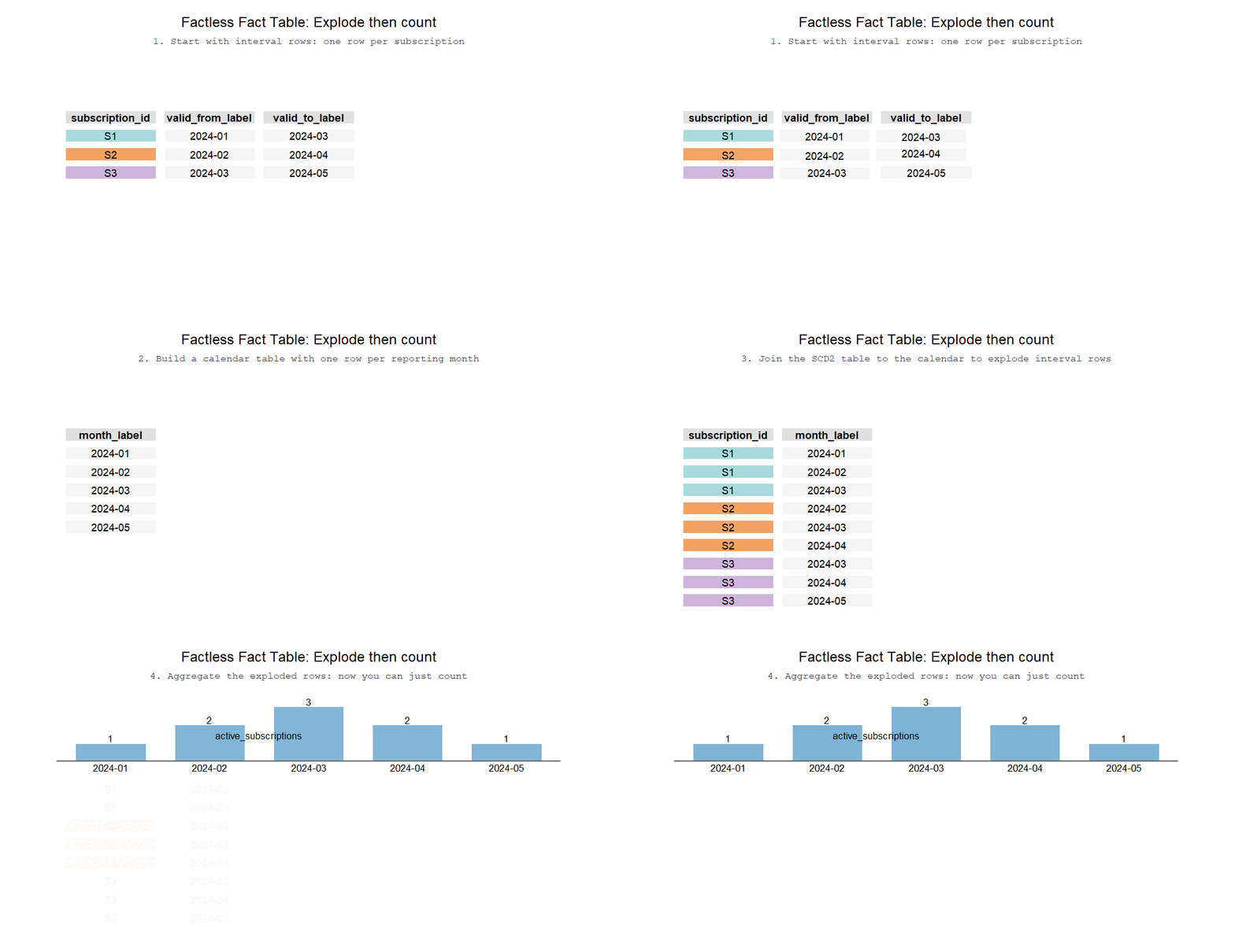
Whenever we want to count something, it’s best to count it using a fact table. However, subscriptions are a SCD2 type dimension and you want to count whether they existed between the valid_from and valid_to. Counting becomes trivial if the date range is expanded into their dedicated rows. For example, if I were building a monthly fact table, the first id would be 6 rows and my second id would be 4 rows because they were active subscriptions during those months. In order to build it, it’s best to have a calendar table so that we could perform a cross join using a BETWEEN statement.
[[ let’s do a demo with ojs instead of a gif]]
How a factless fact table explodes intervals into months
11.4 SQL code
11.5 How is this different from snapshot fact tables?
You may have heard about snapshot fact tables - they are VERY similar to factless fact tables. In fact, if you saved snapshots of active subscriptions for each month, you’d end up with the same table! The different comes down to implementation: snapshots are run on a regular basis to create the final dataset, a factless fact table can be recreated from scratch.
Kimball defines Factless Fact Tables as a table of dimensional entities coming together at a moment in time. Now that’s one eldtrich definition! In human terms, the raison d’être of these tables comes from the need to count whether a thing existed at a point in time. And if that definition is too vague, here’s an exercise - try showing how many subscribers you had on a monthly basis. For example, let’s say I had 10 subscriptions that were each active between January and December of last year, how would you show those 10 subscriptions for each month of the year? In Power BI, you need to resort to a multi-line DAX formula. In Tableau, the options have 8 steps in them. Factless fact tables sidestep these solution altogether so that all you need is a simple count.
Factless fact tables can be built by combining your SCD2 type table (i.e. data that has an end date and a start date) with a calendar table (a date dimension). Here’s how to do it in SQL:
in your favourite BI tool
Factless fact tables solve this problem by showing whether a thing existed for a given time point. For example, if we were to build a factless table on a monthly granularity, a Netflix subscriber whose subscription starts at 2025-01-01 and ends at 2025-12-31 would show up as 12 rows, one for each of the months in a year. As a result, if you were to put your months on an x-axis, you could just do a count of rows from this table along the y axis. And it’s not just subscribers - it works on any table that has a start date and an end date1. Factless fact tables allow you to keep the modeling and KPI layer relatively simple - learning to build and use them is extremely helpful.
11.6 Sample SQL
12 Creating a Factless Fact Table
Note
Hey Paulius, can you quickly create this table that shows our subscriber count over time?
If you’re working with SCD Type 2 data (e.g. subscriptions, marketing campaigns), it’s straightforward to count the number of rows at a single point in time:
with months as (selectdistinct start_of_monthfrom calendar)select subscription_id, start_of_monthfrom subscriptionsinnerjoin months on start_of_month between valid_from and ifnull(valid_to,'2099-01-01')orderby subscription_id, start_of_month
Displaying records 1 - 10
subscription_id
start_of_month
1
2025-02-01
1
2025-03-01
1
2025-04-01
1
2025-05-01
1
2025-06-01
1
2025-07-01
1
2025-08-01
1
2025-09-01
1
2025-10-01
1
2025-11-01
selectcount(*)from subscriptionswhere'2024-08-01'between date_from and date_to
But it’s not if you’d like to count it over multiple points in time, i.e. how do you group by each month of a year and show how many subscriptions were active for a given month? The problem can be solved two ways!
12.1 Without using a calendar table
with d as (select validfrom as dte, 1as incfrom tunionallselect validto, -1from t )select dte, sum(sum(inc)) over (orderby dte)from dgroupby dteorderby dte;